
connections

Connect the tools you already use.

GitHub, GitLab, Jira and Confluence, Linear, Sentry, Notion, Supabase, Stripe and more: 30 services DJ can connect to in one click, plus any MCP server you run yourself. A fix can start from the real Sentry error, a plan from the Jira ticket, and DJ can update the Linear issue as it works.

how it works

Connected in a click

Pick a service

Open Settings → Connections in your console and choose one. Most need nothing more than a click.

Sign in on its own page

You sign in where you always do, on the service's own site. There's no app to register and no key to copy.

DJ can use it everywhere

Its tools appear in tasks, Planning Chat, the IDE chat and djg in your terminal. Turn any connection off again in one click.

It reads freely, and asks before it changes anything

Tools that only read run on their own. A tool that could change your data, say closing an issue or changing a record, asks you first in the task, the same way a risky shell command does. You can set every tool of every connection to on, ask or off.
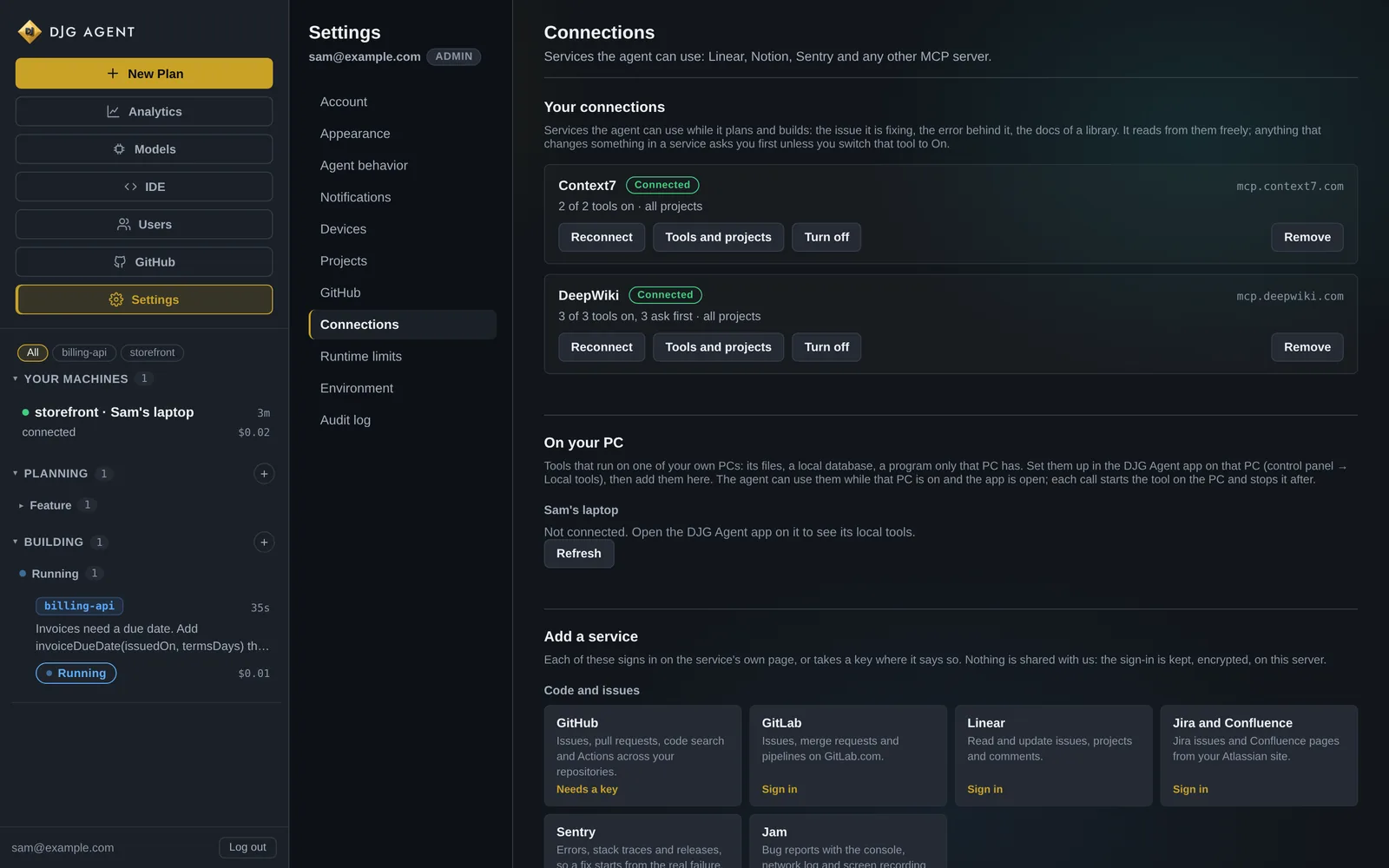
Settings, Connections in the DJG Agent console: two connected services with their tools, tools on your own PC, and the services you can add with one click.
Settings → Connections. Each service shows how many of its tools are on and which ask first.

30 services, one click each

Every connection

Code and issues

  • GitHubIssues, pull requests, code search and Actions across your repositories.
  • GitLabIssues, merge requests and pipelines on GitLab.com.
  • LinearRead and update issues, projects and comments.
  • Jira and ConfluenceJira issues and Confluence pages from your Atlassian site.
  • SentryErrors, stack traces and releases, so a fix starts from the real failure.
  • JamBug reports with the console, network log and screen recording attached.

Docs and knowledge

  • NotionSearch and read your workspace's pages and databases.
  • Context7Current documentation for thousands of libraries, by version.
  • DeepWikiQuestions answered from any public GitHub repository's code and docs.
  • Cloudflare docsSearch Cloudflare's developer documentation.
  • Hugging FaceModels, datasets, Spaces and papers on the Hugging Face Hub.

Databases and hosting

  • SupabaseYour Supabase projects: tables, SQL, logs and edge functions.
  • NeonNeon Postgres projects, branches and queries.
  • Prisma PostgresPrisma Postgres databases, backups and migrations.
  • NetlifySites, deploys and environment settings on Netlify.
  • Cloudflare WorkersWorkers, KV, R2 and D1 in your Cloudflare account.
  • RailwayRailway projects, services, deploys and logs.
  • RenderRender services, deploys, logs and metrics.

Monitoring

  • PostHogProduct analytics, feature flags and errors.
  • Grafana CloudDashboards, metrics, logs and alerts in Grafana Cloud.
  • HoneycombTraces and queries from Honeycomb.

Business

  • StripeCustomers, payments, products and the Stripe docs.
  • PayPalInvoices, orders and transactions.
  • AirtableBases, tables and records.
  • monday.comBoards, items and updates.
  • ClickUpTasks, lists and docs.
  • ZapierThe actions you enable in Zapier, across thousands of apps.
  • CanvaFind, create and export Canva designs.
  • WebflowWebflow sites, pages and CMS collections.
  • WixWix sites, stores and bookings.

and the rest

Anything with an MCP server

Your own servers

Add any MCP server by its address, with a token or custom header if it needs one. Internal tools count too.

Tools on your own PC

With the desktop app, an MCP server running on your machine, behind your firewall, can be used by DJ on your server.

Projects from any git host

Clone a project from GitHub, GitLab, Bitbucket, Azure DevOps, Codeberg or your own git server. Its token is encrypted and never written into the repository.

built in

GitHub goes deeper

Beyond the connection, GitHub is wired into the pipeline itself.

  • An inbox that turns into tasks. Dependabot pull requests, security and code-scanning alerts, review comments and failing checks land in one place. Alerts on the same package arrive as one item, not eleven.
  • Propose or Auto. Propose sends you an approve link; Auto just starts the task. Either way it goes through the review gate.
  • Main moves on green. A merge waits for GitHub Actions on the exact commit that was reviewed. A fix that didn’t close its alert comes back.
  • A token only the gate holds. You create a fine-grained token for just the repositories DJ should touch. It’s handed to the one push after review, never to the agent.
  • New projects get CIA project DJ starts from nothing gets its checks and a GitHub Actions workflow set up for it.
  • One item per packageEleven Dependabot alerts on the same package become one task, and a task whose alert another fix already closed just says so and stops.

Connect your stack and give DJ its first goal

Your own DJG Agent on a private server, set up and kept updated for you. The console, the apps, djg and every connection are included.