
askthe defaultEvery edit is shown as a diff and every command waits for your yes.
djg · for Linux and Windows
djg brings DJG Agent to the code you already have: on your laptop, or on one of your own servers over SSH. DJ reads, edits and runs commands right there and asks before it changes anything. Your code never leaves the machine it’s on, and DJ’s memory, models and budget stay on your DJG server.
Included with every plan. Download it from your console under Settings → Devices.
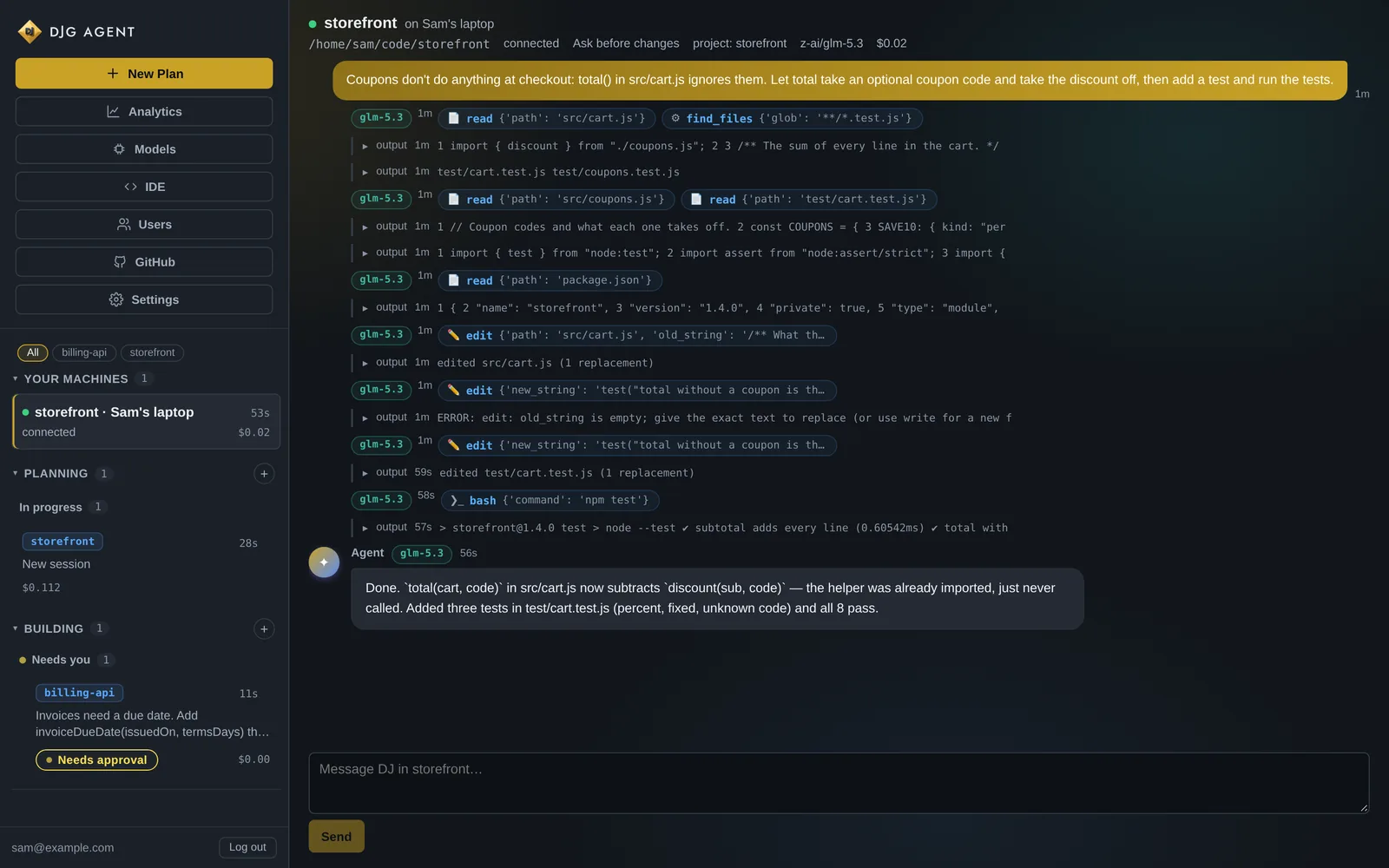
$ cd ~/code/storefront && djg djg 0.9.19 · /home/sam/code/storefront · mode ask (asks before every edit and every command) New session 7d20d846-3288-4f02-8719-cfe11afb6e31 · storefront Watch or steer it on the web: https://acme.djgagent.ai/?cli=7d20d846-3288-4f02-8719-cfe11afb6e31 Type a message for DJ. /help for commands; Ctrl-C stops a turn. > Coupons don't do anything at checkout: total() in src/cart.js ignores them. Let total take an optional coupon code and take the discount off, then add a test and run the tests. ... DJ is working (Ctrl-C to stop) - read src/cart.js - find **/*.test.js in . - read src/coupons.js - read test/cart.test.js - read package.json ? DJ wants to change a file edit src/cart.js -/** What the customer pays. */ -export function total(cart) { +/** What the customer pays, with `code`'s coupon taken off if given. */ +export function total(cart, code) { const sub = subtotal(cart); - return sub; + return sub - discount(sub, code); } Allow? [y]es / [n]o / [a]lways for edits this session: y - edit src/cart.js ? DJ wants to change a file edit test/cart.test.js +test("total takes a percent coupon off the subtotal", () => { + assert.equal(total(cart, "SAVE10"), 49.5); +}); Allow? [y]es / [n]o / [a]lways for edits this session: y - edit test/cart.test.js ? DJ wants to run a command $ npm test Allow? [y]es / [n]o / [a]lways for npm: y - run: npm test [exit 0] DJ: Done. `total(cart, code)` in src/cart.js now subtracts `discount(sub, code)` — the helper was already imported, just never called. Added three tests in test/cart.test.js (percent, fixed, unknown code) and all 8 pass. done · this turn $0.0230 · session $0.0230
three commands
djg login acme.djgagent.aiIt prints a link and a short code. Open the link wherever you're signed in, check the code matches and approve. Works over SSH, too.
cd ~/code/your-project && djgDJ opens a session in that folder. Ask a question, give it a job, or just talk it through.
djg task "fix the failing tests"A whole job on its own branch, start to finish: planned, done, checked, reviewed and committed.
permissions
Pick a mode when you start (djg --mode auto-edit) or switch any time with /mode. Whatever the mode, the rules below hold.
askthe defaultEvery edit is shown as a diff and every command waits for your yes.
auto-editfasterEdits go ahead. Commands still ask.
autohands-offEverything runs, except the risky commands on the deny list, which always ask.
read-onlyjust lookingDJ can read and search, but can't change anything.
Every path is checked on your machine. Anything outside the folder is refused, symlinks included, and nothing under .git is ever written.
.env files, keys, certificates and token files need your yes in every mode, auto included, once per file per session.
ls, grep, cat, find, git status and git log, chained however you like, run without a prompt as long as they stay in the folder and touch no secret.
The same command doesn't ask twice in a session. "Always" covers a program for the rest of it, and git one subcommand at a time.
sudo, rm -rf on / or ~, a download piped into a shell, git push, shutdown, mkfs, dd and anything touching ~/.ssh, in every mode.
The server and the website can't approve anything. A turn started from the website still waits for a yes at the terminal before it runs a command.
djg task
djg task makes a separate working copy on a new branch, so your own checkout is never touched. DJ plans, makes the change and runs your project’s checks. A second model reviews the diff, DJ gets one round to fix what it found, and the work is committed on that branch.
git merge, or throw it away with djg task --discard.$ djg task --mode auto-edit "Add a cartCount(cart) helper to src/cart.js that returns how many items are in the cart, counting quantities, with tests." Task ef862a6e: Add a cartCount(cart) helper to src/cart.js that returns how many items are in the cart, counting quantities, with tests. On branch djg/ef862a6e in /home/sam/code/storefront/.djg/worktrees/ef862a6e. Your own files are not touched. ... DJ is working (Ctrl-C to stop) - read src/cart.js - read test/cart.test.js - edit src/cart.js - edit test/cart.test.js ? DJ wants to run the project's checks lint npm run lint test npm run test Allow? [y]es / [n]o / [a]lways for checks this session: a - run checks: lint, test [passed] DJ: Added `cartCount(cart)` to src/cart.js — a reduce over `cart.items` summing `qty`, matching the style of `subtotal` next to it. Tests in test/cart.test.js cover multi-line quantities (2+1 = 3) and an empty cart. Lint and the full test suite pass (10/10). - run checks: lint, test [passed] ? DJ wants to run a command $ git add -A && (git diff --cached --quiet || git commit -q -m "Add a cartCount(cart) helper…") Allow? [y]es / [n]o: y [exit 0] Task ef862a6e finished. checks: passed · review: ok · 1 commit on djg/ef862a6e Take it: cd /home/sam/code/storefront && git merge djg/ef862a6e Look at it: cd /home/sam/code/storefront/.djg/worktrees/ef862a6e Throw it away: djg task --discard ef862a6e done · this turn $0.0555 · session $0.0555
from anywhere
Each djg session shows up live under Your machines in the console: what DJ read, what it changed, what it ran and what it cost. Read along from your phone, or type into the session from the website. Any command a website message leads to still waits for a yes at the terminal.
DJ’s character, its memory of the project, history search, web search and your Connections all come with it into the terminal.
djg opens with a banner that shows the model, your profile, the mode and the folder. /model switches between your profiles.
Run djg in the same folder again and the session carries on with its history. djg --new starts fresh.
platforms
A single static binary for x86-64 and ARM64. Nothing to install alongside it, so it runs on a laptop, a VPS or a Raspberry Pi.
A code-signed djg.exe for x86-64 that runs commands through cmd or, if you prefer, PowerShell.
djg update fetches the latest from your server and checks its signature before it replaces anything.
Your own DJG Agent on a private server, set up and kept updated for you. The console, the apps, djg and every connection are included.